
Writing Specs
The Specs panel is where you define how your project should be built. It brings together system prompts, spec documents, and content files in one place.
The Specs panel is where you define how your project should be built. It brings together system prompts, spec documents, and content files in one place.
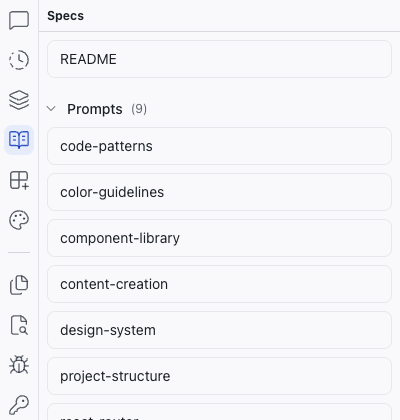
System Prompts
Every project includes a prompts folder containing system prompts that define how the AI behaves. These cover things like coding conventions, design tokens, component structure, and routing patterns. The AI reads them whenever it generates or modifies code.
These prompts are tuned to work with Dazl's architecture and toolchain. You can expand or customize them (for example, adding your own coding conventions or component patterns), but they're best treated as a foundation to build on rather than replace.
Spec Documents
Any markdown files you create to describe what you're building also appear in the Specs panel: feature specs, design direction, technical constraints, or a project README. This makes it a convenient place to write and edit requirements, PRDs, acceptance criteria, or any context that helps the AI understand what you're building.
Content Files
Markdown files that are part of the project itself (like individual blog posts, help articles, or landing page copy) also show up here. You can write and edit them directly in the Specs panel alongside your specs and prompts.
You can right-click any file in the Specs panel to attach it as context to the chat, so the AI considers it when making changes.
The Spec Editor
Click any file in the Specs panel to open it as a tab in the center area.
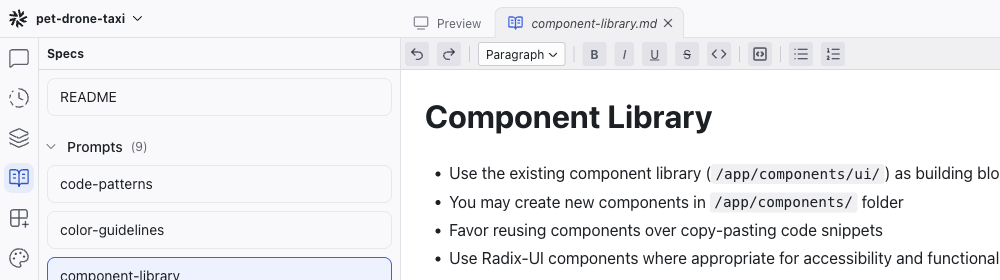
The spec editor is a WYSIWYG markdown editor with a formatting toolbar that includes:
- Undo and Redo
- Format dropdown – switch between Paragraph, Heading 1, Heading 2, Heading 3
- Text formatting – Bold, Italic, Underline, Strikethrough, Inline Code
- Blocks – Code Block, Bullet List, Numbered List
You can write and edit specs visually without needing to know markdown syntax, though the underlying format is standard markdown.
Writing Your Own Specs
Some practical approaches for markdown spec files:
- Feature specs – describe a feature's behavior, edge cases, and user flows
- Design direction – specify the visual tone, brand constraints, or reference styles
- Technical constraints – list technologies to use or avoid, API patterns, data structures
- Accessibility requirements – define WCAG compliance levels or specific needs
Better specs lead to better AI results. A clear spec reduces back-and-forth because the AI understands your intent from the start.
You don't need to write a 20-page PRD. A focused, 1-2 page spec paired with an interactive prototype communicates more than a lengthy document ever could.
Specs as Living Documentation
Specs aren't just for the AI. They serve as living documentation for your team. Since spec files are part of your project, every team member who opens it can see the thinking behind the decisions. This makes handoff clearer and keeps the team aligned.
Related Articles
- Starting a Project – different ways to begin a project, including from specs
- Chat-Driven Editing – how the AI uses specs and context when making changes
- Specs – full reference for the Specs panel