
Specs
The Specs panel is a file browser for your project's specification files: markdown documents that guide the AI's behavior when generating and modifying code.
The Specs panel is a file browser for your project's specification files: markdown documents that guide the AI's behavior when generating and modifying code.
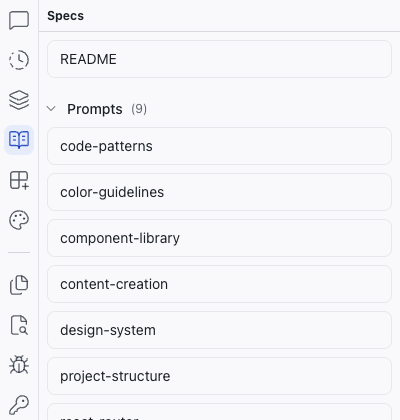
What's in the Specs Panel
The panel surfaces three types of content:
- System prompts – the
Prompts/folder ships with every project. These define how the AI behaves, covering coding conventions, design tokens, component structure, routing patterns, and more. - Spec documents – any markdown files you create to describe what you're building: feature specs, design direction, technical constraints, or a project README.
- Content files – markdown files that are part of the project itself, like individual blog posts, help articles, or landing page copy.
Editing Specs
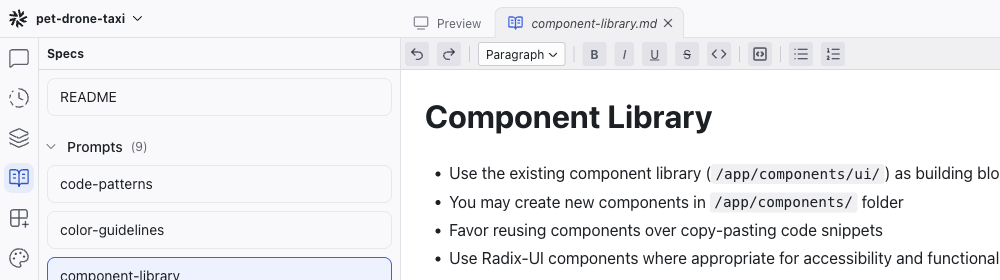
Click a spec file to open it as a tab in the center area. The editor is a WYSIWYG markdown editor with a formatting toolbar:
- Format dropdown – switch between Paragraph, Heading 1, Heading 2, Heading 3
- Text formatting – Bold, Italic, Underline, Strikethrough, Inline Code
- Blocks – Code Block, Bullet List, Numbered List
Related Articles
- Writing Specs – guide to writing effective specs
- Chat-Driven Editing – how the AI uses specs
Elements
The Elements panel shows a tree view of your project's component hierarchy for the current page. Click any node to select the corresponding element on the preview.
Integrations
The Integrations panel connects your Dazl project to external services. It has two tabs: Integrations for MCP connections to external platforms, and Add-ons for library recipes.