
Pages and Routing
The Pages dropdown in the top bar shows all the routes in your project and lets you navigate between them in the preview.
The Pages dropdown in the top bar shows all the routes in your project and lets you navigate between them in the preview.
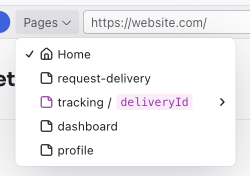
Page List
- Current page shown with a checkmark
- Dynamic route parameters shown in code style (e.g.,
tracking /deliveryId) - Warning icon on dynamic routes with unresolved parameters
- Click any page to navigate the preview to that route
Dynamic Pages
Dazl recognizes dynamic routes in your project — pages where the URL contains a variable parameter (e.g., a product ID or user ID).
If a dynamic route doesn't have resolved parameter values yet, the Pages dropdown shows a warning icon next to it with the tooltip: "This page is dynamic and does not have a route description, click to fix with AI."
Clicking the warning icon tells the AI to analyze your route configuration and data, then create a route description — a file that maps the dynamic parameter to real values from your project. For example, a /tracking/:deliveryId route might get a route description that suggests three deliveries from your mock data, each with a descriptive title like "Buddy – In Transit" or "Whiskers – Completed."
Once the route description is created, the dynamic route expands into a submenu in the Pages dropdown, listing each suggested value. Click any one to navigate the preview to that specific page. The submenu also includes a Refresh data option to re-fetch the suggested values.
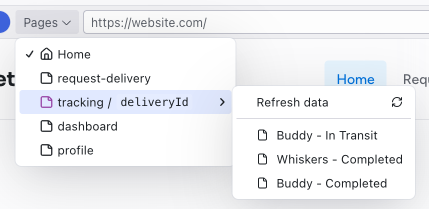
When connected to a database through Supabase, Dazl can resolve parameter values from live data instead of mock data, letting you preview data-driven pages with real content.
Dev Routes
Dev routes are pages that exist only during development — admin panels, CMS interfaces, data management tools. You create them by asking the AI in chat (e.g., "add a dev route for managing localization strings"). They're visible in the editor but excluded from the published project.
This lets non-technical team members manage application data through a friendly interface. For example, you could ask the AI to build a localization editor or a content management panel that your team uses during development, without it appearing in the final published prototype.
Dev routes are a way to build internal tooling alongside your interactive prototype. A PM can create a CMS to manage product data without needing to use developer-oriented tools like a Supabase dashboard directly.
Related Articles
- Publishing – dev routes are excluded from published projects
- Integrations – Supabase for database-driven dynamic pages
Inspect
The Inspect panel opens on the right side of the editor and shows detailed information about the currently selected element. It has two tabs: Style and Props.
Publishing
Publish your project to a live URL that anyone can visit, and optionally connect a custom domain for a polished presentation.