
Add-ons
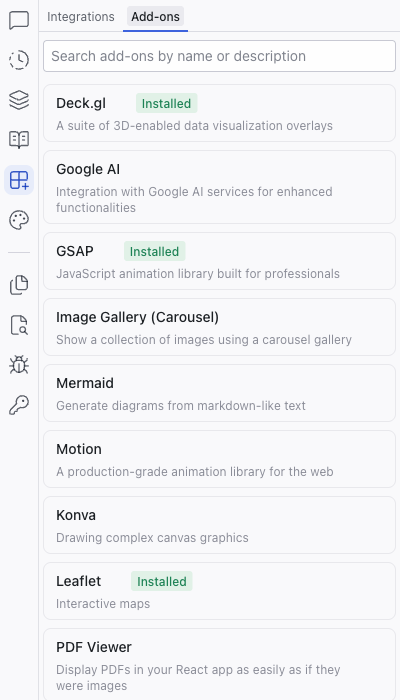
Add-ons are pre-built recipes that help install and configure libraries in your project. They live in the Add-ons tab within the Integrations panel, and handle the initial setup steps (installing packages, creating configuration files, adding boilerplate) so you can start using a library without deep technical knowledge.
Add-ons are pre-built recipes that help install and configure libraries in your project. They live in the Add-ons tab within the Integrations panel, and handle the initial setup steps (installing packages, creating configuration files, adding boilerplate) so you can start using a library without deep technical knowledge.
How Add-ons Work
- Click an add-on to see its details, description, and tags
- Click Install to add the package to your project
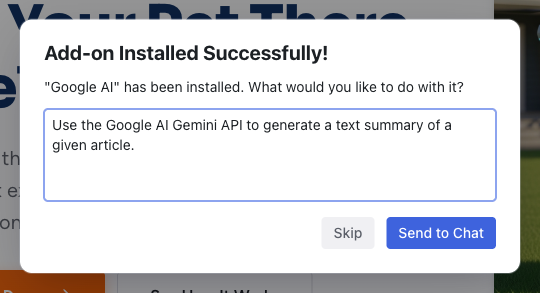
- A success dialog appears asking what you'd like to do with the library, pre-filled with a suggested prompt
- Click Send to Chat to have the AI start using the library in your project, or Skip to install without further action
Installed add-ons show an "Installed" badge in the catalog.
Available Add-ons
| Add-on | Description |
|---|---|
| Deck.gl | 3D-enabled data visualization overlays |
| Google AI | Integration with Google AI services |
| GSAP | JavaScript animation library |
| Image Gallery (Carousel) | Image carousel gallery |
| Konva | Complex canvas graphics |
| Leaflet | Interactive maps |
| Mermaid | Diagrams from markdown-like text |
| Motion | Production-grade animation library |
| PDF Viewer | Display PDFs in your app |
| ProseMirror | Structured document editor (WYSIWYG) |
| Text Loading Animation | Text loading animation effects |
| Three.js | 3D graphics in the browser |
| XYFlow | Node-based editors and interactive flow charts |
The catalog is updated regularly. Use the search box at the top of the panel to find add-ons by name or description.
Add-ons are different from Integrations. Integrations (Supabase, Figma) are MCP connections that give the AI tools to interact with external services. Add-ons are library recipes that configure packages within your project.
Related Articles
- Integrations – MCP-based service connections
- Chat-Driven Editing – using add-ons through the AI chat
Integrations
The Integrations panel connects your Dazl project to external services. It has two tabs: Integrations for MCP connections to external platforms, and Add-ons for library recipes.
Theme
The Theme panel manages your project's design system: semantic color tokens and typography scales that apply consistently across every component. It has two tabs, Color and Typography.