
Feature Reference
Keyboard Shortcuts
Keyboard shortcuts for common actions in the Dazl editor. Open the full list anytime by pressing Shift+? or by selecting Keyboard Shortcuts from the Project menu.
Keyboard shortcuts for common actions in the Dazl editor. Open the full list anytime by pressing Shift+? or by selecting Keyboard Shortcuts from the Project menu (click the project name in the top-left corner).
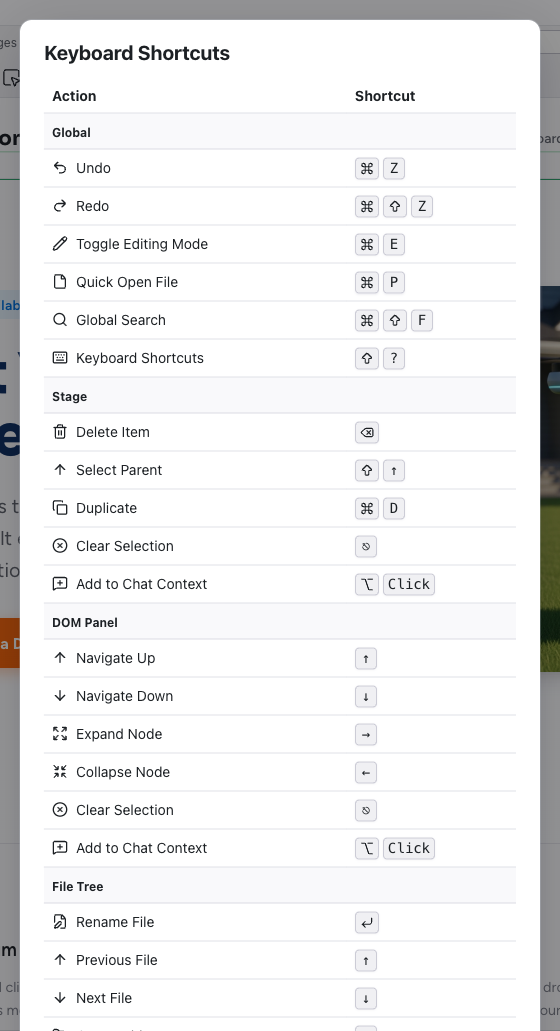
Global
| Action | Mac | Windows/Linux |
|---|---|---|
| Undo | Cmd+Z | Ctrl+Z |
| Redo | Cmd+Shift+Z | Ctrl+Shift+Z |
| Toggle Editing Mode | Cmd+E | Ctrl+E |
| Quick Open File | Cmd+P | Ctrl+P |
| Global Search | Cmd+Shift+F | Ctrl+Shift+F |
| Keyboard Shortcuts | Shift+? | Shift+? |
Stage
These shortcuts apply when working with elements on the preview canvas.
| Action | Mac | Windows/Linux |
|---|---|---|
| Delete Item | Backspace | Delete |
| Select Parent | Shift+Up | Shift+Up |
| Duplicate | Cmd+D | Ctrl+D |
| Clear Selection | Escape | Escape |
| Add to Chat Context | Cmd+Click | Ctrl+Click |
DOM Panel
These shortcuts apply when navigating the Elements tree.
| Action | Shortcut |
|---|---|
| Navigate Up | Up Arrow |
| Navigate Down | Down Arrow |
| Expand Node | Right Arrow |
| Collapse Node | Left Arrow |
| Clear Selection | Escape |
| Add to Chat Context | Cmd+Click (Mac) / Ctrl+Click (Windows) |
File Tree
These shortcuts apply when navigating the Files panel.
| Action | Shortcut |
|---|---|
| Rename File | Enter |
| Previous File | Up Arrow |
| Next File | Down Arrow |
| Open Folder | Right Arrow |
| Close Folder | Left Arrow |
| Select File | Space |
Related Articles
- The Editor Layout – overview of the workspace
- Visual Editing – editing elements on the canvas
- Elements – the Elements tree panel
- Files – the Files panel