
Feature Reference
Search
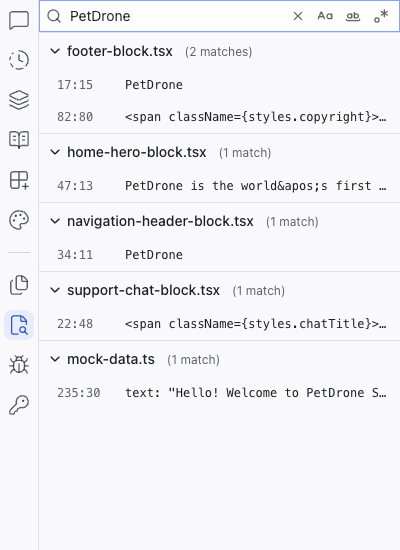
The Search panel lets you search for text across all files in your project. Type a query in the search box and results appear instantly, grouped by file.
The Search panel lets you search for text across all files in your project. Type a query in the search box and results appear instantly, grouped by file.
Search Options
Three toggle buttons next to the search box control how matching works:
- Match Case – toggle case-sensitive search
- Match Whole Word – match complete words only
- Use Regular Expression – use regex for pattern matching
Results
A summary line shows the total number of results and files matched (e.g., "6 results in 5 files"). Results are grouped by filename, with each file showing a match count. Expand a file group to see individual matches with line and column numbers and a preview of the matching line.
Click any result to open the file in the code editor at that line.
Related Articles
- Files – browse the file tree
- Working with Code – editing code directly